Blog · Use case
How to choose a Sivella personality for your household
To choose a Sivella personality, compare how each available option makes the shared dashboard feel, then use the one your household finds easiest to return to. A personality changes the dashboard's tone, color, and density without changing stored household data, and you can switch between available personalities instantly in Settings.

Choosing a personality in Sivella is a choice about how the household's shared context is presented. It does not create a different set of tasks, decisions, or memories. It changes the tone, color, and density of the whole dashboard, so the useful question is not which personality sounds best in isolation. It is which one makes the household more willing to look, understand what matters, and come back tomorrow.
What does a Sivella personality change?
A personality applies across the whole dashboard, not only to assistant chat. The tone of the language, the color treatment, and the amount of information presented together all change with it. That makes the choice more practical than picking a voice for occasional conversations.
The household's stored data does not change when the personality changes. Tasks keep their owners, decisions keep their options and constraints, and memory remains the same shared record. Switching changes the way that context meets the household, rather than replacing the context itself.
This distinction makes experimentation low-risk. You do not need to predict the right choice before the system contains anything important. The work stays where it is while the presentation changes around it.
Which Sivella personalities can a household use now?
Serenity and Focus are the personalities available today. Serenity is preselected during setup, so a new household can continue without pausing over the choice. It can be changed later in Settings.
Sivella also names Nurture, Steward, and Mirror. Those three have not launched. They can be previewed in Settings, but selecting a preview does not move the dashboard away from an available personality. Until they ship, the working choice remains between Serenity and Focus.
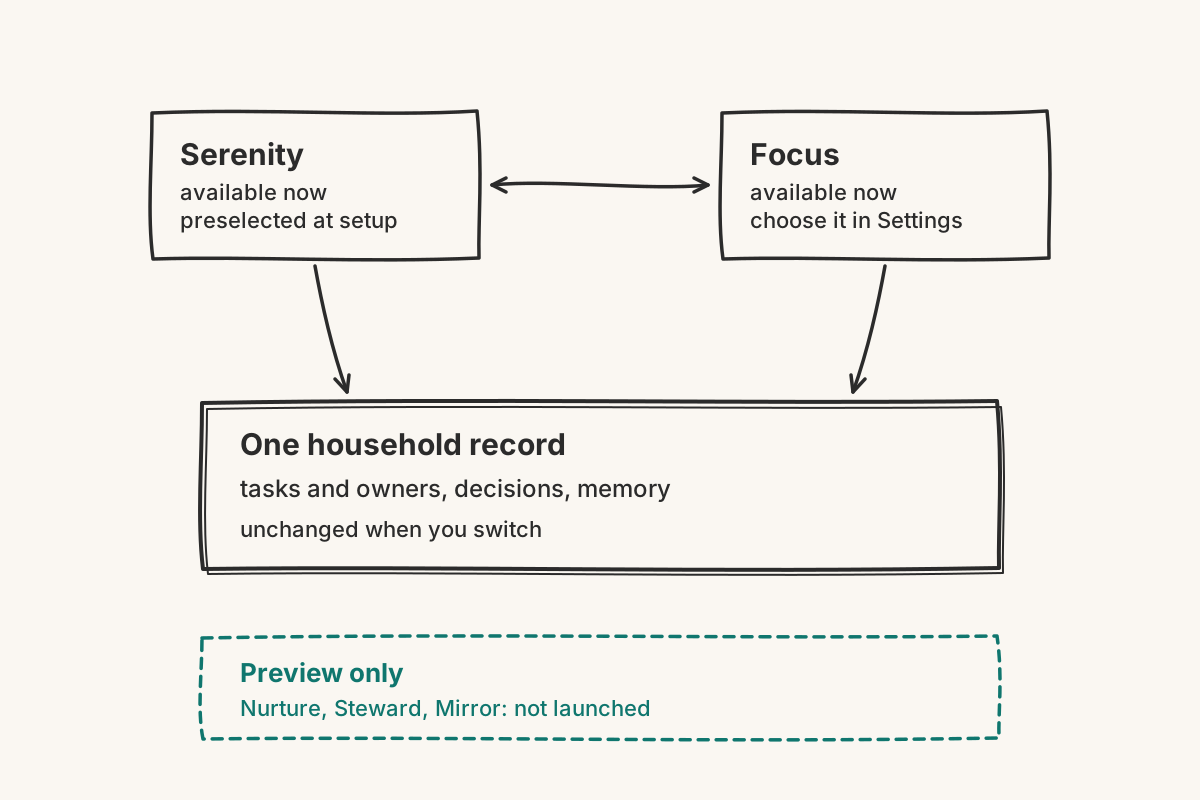
That boundary is worth keeping clear when several people are setting up the household together. A preview can help the household understand a future direction, but it is not an option to plan the current system around.
How should you choose between Serenity and Focus?
Choose with a small amount of real household context already in view. Add a few current tasks, one decision that needs movement, and the next piece of upcoming spending. Then look at the same material under each available personality. Because switching is instant and does not alter stored data, the comparison can be made without rebuilding anything.
Ask each household member three concrete questions:
- Can you tell what needs attention without someone explaining the screen?
- Is there enough context to act without opening every item?
- Does the dashboard make ordinary household work feel clearer rather than louder?
The answers do not need to be unanimous on style. The useful choice is the one people can read reliably. A household operating layer only reduces the load held in private memory when the people sharing it are comfortable looking for themselves.
Make the decision after using both options, not from their names. Names suggest a register; the dashboard itself shows how tone, color, and density work together with your household's information.
When should you change the household personality?
Change it when the current presentation starts getting in the way of seeing the next step. A household may want a different balance after adding more context, or after learning that one presentation is easier for everyone to scan. Since switching is instant, this does not need to become a permanent decision made during setup.
Treat the personality as a setting the household can revisit, not as an identity it has to defend. Keep the stored work stable, try the other available option, and judge it against an ordinary week. The right choice is the one that helps tasks, decisions, budget context, and today's next steps stay visible without adding urgency that is not there.