Blog · Template
How to delete a Sivella account
To delete a Sivella account, send the request to [email protected]. Deletion deactivates the account immediately, leaves a 120-day recovery window, and then irreversibly anonymizes it. Sivella handles deletion requests within 30 days, so include enough account information for the team to identify the right account without putting household details in the message.

To delete a Sivella account, send the request to [email protected]. Deletion deactivates the account immediately, leaves a 120-day recovery window, and then irreversibly anonymizes it. Sivella handles deletion requests within 30 days, so include enough account information for the team to identify the right account without putting household details in the message.
Deleting an account is different from correcting something Sivella remembers. Household memory is inspectable and editable, and a member can remove what Sivella has stored. Account deletion is the route for ending the account itself. Before requesting it, decide which outcome you mean.
Where do you send a Sivella account deletion request?
Send the request to [email protected]. This is the published address for both deletion and export requests. Sivella states that these requests are handled within 30 days.
Write from an email address associated with the account if possible. State clearly that you are requesting account deletion and identify the account that should be closed. You do not need to explain why you are leaving. Avoid copying household tasks, decisions, calendar information, or other private context into the email; the purpose of the message is to identify the account and the request.
A short request can say:
Please delete the Sivella account associated with this email address. Please confirm when the request has been processed and the 120-day recovery window has begun.
The published facts do not establish a separate in-product deletion route, so this guide does not assume one. Use the privacy address rather than relying on a setting that has not been documented.
What happens after you request deletion?
Account deletion deactivates the account immediately. A 120-day recovery window follows. After that window, the account is irreversibly anonymized.
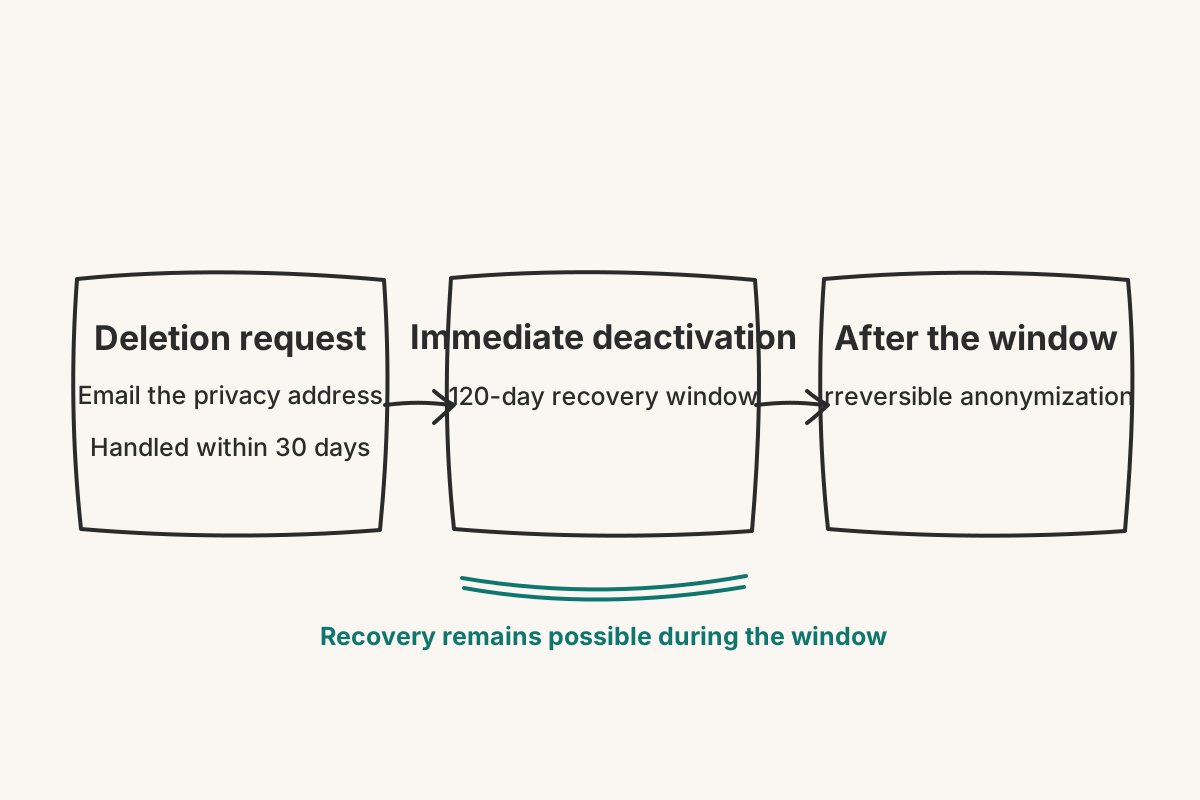
Those stages answer two different questions. Deactivation ends active use at the start of the process. The recovery window leaves a defined period before the final stage. Irreversible anonymization happens after that period, not at the moment the request is sent.
Keep the confirmation of your request somewhere outside Sivella. It gives you a record of when you wrote and helps you place the 120-day window without depending on access to the deactivated account.
Can you recover the account during the 120-day window?
The published privacy information describes the 120 days as a recovery window. If you need the account restored during that period, contact [email protected] promptly and refer to the original deletion request. Do not wait until the end of the window, because the stage after it is described as irreversible.
This guide does not promise a particular recovery screen, button, or response time beyond the stated handling of privacy requests within 30 days. The reliable action is to write to the same privacy address, clearly identify the account, and state that you are asking to recover it during the window.
If there is any chance the household will need information later, consider requesting an export before deletion. The same privacy address handles export requests. The published facts confirm the request route, but do not establish a self-service export control or formats beyond the privacy archive.
Should you edit household memory instead of deleting the account?
Use the smaller action when the problem is a specific stored fact rather than the account. Sivella lets members inspect, edit, or remove what it has stored. Correcting an old address, removing stale context, or changing an inaccurate memory does not require ending the account.
Deletion is appropriate when the intended result is to close the account and begin the recovery-and-anonymization sequence. Editing memory is appropriate when the household still wants to use Sivella but needs its shared context to be accurate.
The distinction keeps an irreversible process proportionate. First decide whether you want to remove a fact or end the account. Then use the documented route: edit the stored context for the first case, or email the privacy address for the second.